Fake Text Message1.1.7
Publisher Description
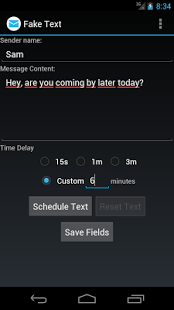
Want your friends to think you're getting a text from someone important? Wish you got a text to have an excuse to leave an awkward situation?
With Fake Text, you can do all that and more! Fake Text is an application that simulates an incoming text with customizable sender name and time delay.
Includes a widget that can be used to schedule a fake text directly from your Home screen.
How to use:
Regular Text:
Start the application and fill in the sender name and the time delay you wish to have for the text, then press Schedule Text. If you change your mind, you can cancel the text with the Reset Text button at any time, even if you have closed the app since then.
Widget-triggered Text:
The Fake Text widget allows you to schedule a fake Text with a single press of a button. Simply add the widget to your Android device and click it to schedule a text. Blue icon means it's ready to schedule a text, while red icon means there's a scheduled text in progress.
If you wish to have the widget generate a text with a custom sender name and delay, use the Save Fields button in the main application.
About Fake Text Message
The company that develops Fake Text Message is Solar Flare Labs. The latest version released by its developer is 1.1.7. This app was rated by 1 users of our site and has an average rating of 5.0.
To install Fake Text Message on your Android device, just click the green Continue To App button above to start the installation process. The app is listed on our website since 2014-08-27 and was downloaded 132 times. We have already checked if the download link is safe, however for your own protection we recommend that you scan the downloaded app with your antivirus. Your antivirus may detect the Fake Text Message as malware as malware if the download link to com.blogspot.solarflarelabs.faketext is broken.
How to install Fake Text Message on your Android device:
- Click on the Continue To App button on our website. This will redirect you to Google Play.
- Once the Fake Text Message is shown in the Google Play listing of your Android device, you can start its download and installation. Tap on the Install button located below the search bar and to the right of the app icon.
- A pop-up window with the permissions required by Fake Text Message will be shown. Click on Accept to continue the process.
- Fake Text Message will be downloaded onto your device, displaying a progress. Once the download completes, the installation will start and you'll get a notification after the installation is finished.
Program Details
System requirements
Download information
Pricing
Version History
version 1.1.7
posted on 2014-08-27
version 1.0.4
posted on 2013-05-08
Several fixes and updates
